


Applebee's
4.112.74K Reviews
App Specs
- Version
- 4.5.32
- Updated On
- License
- Free
- Downloads
- 1,000,000+
- Developer
- Applebee's
- Categories
- Food & Drink
- Platform
- Android, iOS
Screenshots

 Analysis by AppCompare
I often think of the Applebee's app as most useful at the moment a household needs to make a quick dinner decision. One person may want to browse the menu, another may already know what they usually order, and someone else may be checking where to pick up food. Bringing those tasks together can make a shared meal easier to organize, especially when the choice is already Applebee's. I would not treat it as a general restaurant-finder or a replacement for every way of ordering, though: its value is tied to planning a visit or order with this one restaurant.
A shared screen for a shared meal
For a couple, roommates, or a family deciding on takeout, the app can serve as a common place to review choices before anyone commits. I find that useful because browsing first can prevent the familiar back-and-forth of one person placing an order while everyone else is still deciding. A practical approach is to agree on the location and meal plan first, then let each person check their own selections before the order is submitted. That small pause matters when several people are choosing different items or customizations.
The app is free, and Applebee's is the developer. It is a food-and-drink app rather than a broad delivery marketplace, so I would use it when I already have Applebee's in mind. Its average rating is 4.1 from around 41,000 ratings, and it has been installed over a million times. Those figures suggest a well-used service, but they do not tell me whether a particular location or order will suit my needs; I still check the details before relying on it for a group meal.
Keep the order process deliberate
Ordering through one phone is convenient, but it also puts the final choices in one person's hands. If several people are contributing, I would have everyone confirm their items and any changes out loud before the person holding the phone checks out. That is especially helpful when a household has similar-looking meals or when someone has a specific ingredient preference. Saving a familiar order can speed up a repeat visit, but I would review it rather than assume every saved choice fits tonight's plans.
Customization is one of the app's more useful ideas because a group rarely orders everything exactly as shown on a menu. Still, I would not interpret a dietary filter or an item description as a guarantee that a dish meets a strict medical need. For an allergy or a serious dietary restriction, confirm the relevant details with the restaurant before ordering. The app helps with browsing and selection; a quick check with the location is the more sensible step when the stakes are higher.
Account boundaries and everyday coordination
A shared device can be handy in a household, but it is worth deciding who will handle the account and payment details before placing an order. I would avoid passing a phone around while someone is signed in and payment is ready, particularly if children are helping choose dinner. An adult can collect everyone's choices, review the total and customizations, and make the final decision. That keeps the convenience of a shared menu without confusing browsing with permission to buy.
For a realistic weeknight, imagine that everyone is home at different times and the person coordinating dinner has only a few minutes to settle the plan. They can use the menu to narrow down choices, check the nearby restaurant, and place an order once the household agrees. If the group is still debating cuisines, a general restaurant app or a quick call may be a better first step. Applebee's works best after the decision to eat there has already been made.
Worth Reading Before You Choose

EA SPORTS FC Mobile 26 Is a Bigger Football Game, but It Takes Time

Flipboard Shows What News Apps Must Do Beyond the Feed

Switching to Android Auto Means Rethinking Your Driving Routine

Google Calendar Makes a Crowded Week Easier to Manage

Ludo King Makes the Most of the Minutes Between Plans

Baby Panda World Brings Quick Play to Modern Phones, but Its Game Library Feels Busy
Age, trust, and who should use it
The app is rated for Everyone, which makes it suitable for general audiences to browse, but that is not the same as a reason to give a child control of an order or payment. I would let younger household members look at menu choices with an adult, then keep the final review and checkout with whoever is responsible for the purchase. The app's current version is 4.5.30 and it supports devices running Android 8.0 or later, details worth checking if an older phone is being used for the household.
Applebee's released the app on December 2, 2015, and its current version reflects an ongoing product rather than a one-off menu page. I find its strongest audience is people who order from Applebee's more than occasionally, want to customize choices, or prefer to plan before arriving. Someone who rarely eats there, wants to compare many restaurants at once, or prefers speaking directly with staff may be better served by a different option. The app is not automatically the easiest path for every diner just because it puts ordering on a phone.
Exploring the Interface
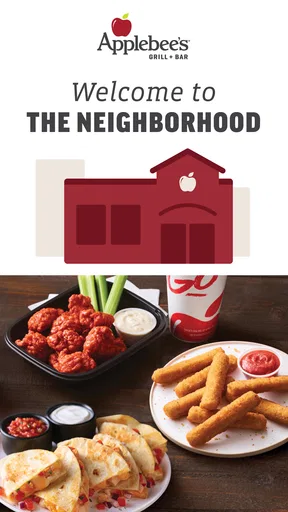
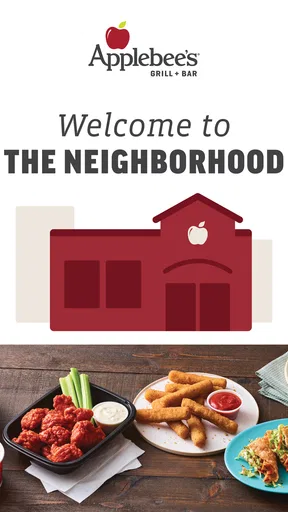
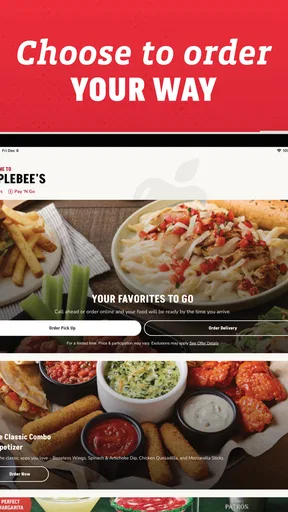
First things first, let’s talk about the user interface. The moment you fire up the app, you’re greeted with a clean and vibrant design that’s super easy to navigate. It's like Applebee's took their cozy restaurant vibe and squeezed it into your phone. The main screen offers up all your essential options right at your fingertips. You’ve got your menu, your local offers, and even a handy little section to find the nearest Applebee's location. It’s intuitive, and you won’t find yourself getting lost in the app’s features.
Menu Magic
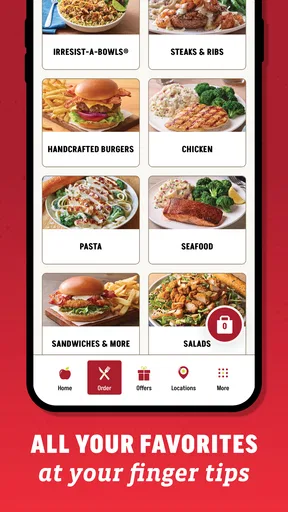
Now, onto the heart of the app—the menu! It's laid out beautifully, showing off every delicious dish in all its glory. From their legendary burgers to those finger-licking wings, you can scroll through and drool over each option. The app does a fantastic job of breaking everything down into categories, so whether you're in the mood for some healthy options or you’re ready to dive into some comfort food, it’s all clearly laid out.
Each menu item comes complete with a slick photo and detailed description, which is perfect for those nights when you can’t quite decide what you’re in the mood for. Plus, there are filters for dietary preferences, so if you're avoiding gluten or need vegetarian options, the app has got you covered.
Order and Pay with Ease
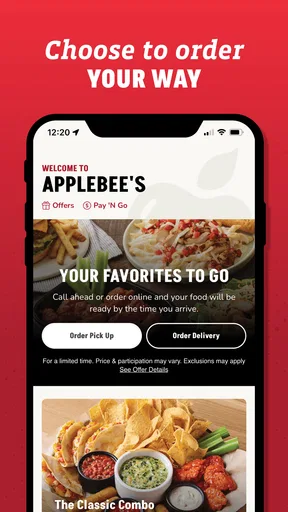
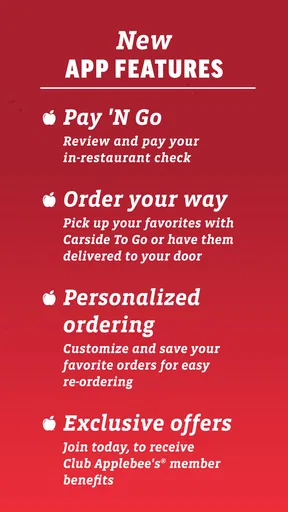
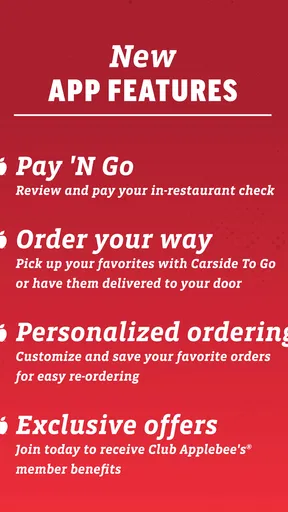
One of the standout features is the ability to order directly through the app. You can customize your order as much as you want, and the app lets you save your favorite orders for next time. This is perfect for the creature of habit who knows exactly what they want. Once your order is set, paying through the app is a breeze. You can use card payment or even link your Apple Pay, making the whole process seamless.
And here’s a little insider tip: keep an eye on the app for exclusive deals and offers. These pop up regularly, and who doesn’t love scoring a good meal deal?
Finding Your Local Spot
Traveling or just craving a night out? The app’s location feature is your new best friend. With its integrated map, you can find the nearest Applebee's in no time. It’ll even show you the opening hours, so you know exactly when to head over for that late-night snack or after-work dinner.
Stay in the Loop
Another great feature of the app is the notifications. You can opt-in to receive updates on new menu items, special events, and even seasonal offers. It’s like having your own personal Applebee's concierge keeping you in the loop. No more missing out on those limited-time-only dishes!
Where it fits among dining options
Compared with the usual alternatives, such as browsing a restaurant's website, calling a location, or opening a multi-restaurant ordering service, this app is most appealing when you want Applebee's-specific choices and a direct route to its menu and ordering tools. A marketplace may be more helpful when the group has not chosen a restaurant, while a call is often the safer route for a complicated request that needs a human answer. I see the app as a focused convenience, not a universal solution.
One useful habit is to browse before the household gets hungry. Looking at descriptions and photos in advance gives everyone time to compare dishes without the pressure of a checkout screen waiting. If an offer catches your eye, check the details in the app while you are deciding rather than building the entire meal around an assumption about what qualifies. That makes a promotion a pleasant bonus instead of a source of last-minute confusion.
Another trade-off is that saved favorites are best for speed, not for decision-making. They can be a handy starting point on a familiar night, but a saved order can also make it easy to overlook a changed preference or an item someone no longer wants. I would use it as a reminder of a previous choice, then review every item and customization with the people sharing the meal. For a group, that quick check is more valuable than shaving off a few taps.
Questions worth settling before checkout
Is it useful if I only want to browse? Yes: the menu and location tools make it useful for planning even when I am not ready to order. Does it help with a group order? It can, provided one person coordinates and reads back the choices before submitting them. Can I rely on its dietary browsing for an allergy? I would use it to narrow down options, then contact the restaurant to confirm anything safety-critical. Those are practical boundaries, not reasons to dismiss the app.
Will it replace a general food-ordering app? Not if I want to compare several restaurants or decide among different cuisines; its focus is Applebee's. Is it a good fit for children? It is appropriate for general audiences to browse, but I would keep account access, payment and final checkout with an adult. Thinking through those questions ahead of time makes the app easier to use responsibly and helps avoid treating convenience as a substitute for household agreement.
The Final Bite
So, what’s the verdict? The Applebee's app is more than just a digital menu—it's a full-on dining companion that enhances your Applebee's experience. Whether you're dining in, ordering out, or just planning your next meal, this app is loaded with features that make it a must-have for any foodie. It’s like having the whole Applebee's vibe right there in your pocket. So go ahead, download it, and get ready to satisfy those cravings with just a few taps!
My recommendation is more measured: I would keep it on my phone if Applebee's is a regular choice and I value browsing, customization, and coordinating a familiar order. I would not install it expecting a way to compare every local restaurant, nor would I rely on an app screen alone for a serious dietary concern. For a household, the best use is simple: let everyone help choose, keep one responsible person in charge of checkout, and verify the details that matter before the order goes through. In that role, it is a practical companion rather than a necessity.
Pros
- User-friendly interface for easy navigation.
- Extensive menu with detailed item descriptions.
- Convenient online ordering and payment options.
- Location finder with integrated GPS support.
- Frequent updates with new features and improvements.
Cons
- Limited availability of delivery in some areas.
- Occasional app crashes during peak hours.
- User reviews are not always up to date.
- Some items may not reflect in-app promotions.
- Notifications can be overly frequent and intrusive.
FAQs for Applebee's
What is the Applebee’s app and what features does it offer?
The Applebee’s app is a convenient tool for customers to order food, make reservations, and access exclusive offers. It features a user-friendly interface that allows you to browse the menu, customize orders, and pay directly through the app. Users can also find nearby locations and check for special promotions or discounts.
Can I use the Applebee’s app to order takeout or delivery?
Yes, the Applebee’s app supports both takeout and delivery orders. You can easily customize your order, select your preferred pickup or delivery time, and pay directly within the app. It also allows you to track the status of your order, ensuring a smooth and efficient experience.
Does the Applebee’s app offer any rewards or loyalty program?
The app includes a rewards program where you can earn points on purchases, which can be redeemed for discounts or free items. By signing up for the program through the app, users can track their points, receive birthday treats, and access exclusive offers and promotions tailored to their preferences.
Is the Applebee’s app available for both Android and iOS devices?
Yes, the Applebee’s app is available for download on both Android and iOS platforms. Users can find it on the Google Play Store and the Apple App Store. The app is regularly updated to improve functionality and add new features, ensuring compatibility with most devices.
How secure is the payment process on the Applebee’s app?
The Applebee’s app uses secure encryption technologies to protect your payment information. It allows for various payment methods, including credit cards and mobile wallets, ensuring a safe transaction process. User privacy and data security are prioritized, aligning with industry standards to provide a secure experience.


